A lot of businesses ask the same question: can we send the voucher by text instead of email? Yes.
Coupon Carrier does not include a native SMS integration. This setup uses Zapier as the bridge.
If your goal is to send a single-use voucher to someone's phone, this is the simplest setup:
The text message is only how the link gets there. The voucher itself still needs to be unique to the recipient, redeemable once, checkable in person, and trackable after delivery. That is what the Redeem Link handles.
If you want the full online-trigger to in-person-redemption walkthrough, see offline coupon redemption with Zapier.
A plain coupon code in a text message is easy to send, but familiar issues show up quickly:
If the promotion needs to work in the real world, at a restaurant, event, store, car wash, or venue, delivery is only half of the job. You also need controlled redemption.
Instead of texting the raw code, send a Redeem Link. That link opens a hosted voucher page where the customer sees their own offer on their phone.
This works better because each recipient gets a unique voucher, the same link always resolves to the same assigned offer, and redemption can be validated with mark-as-used or QR scanning. SMS handles delivery. Voucher logic stays inside Coupon Carrier.
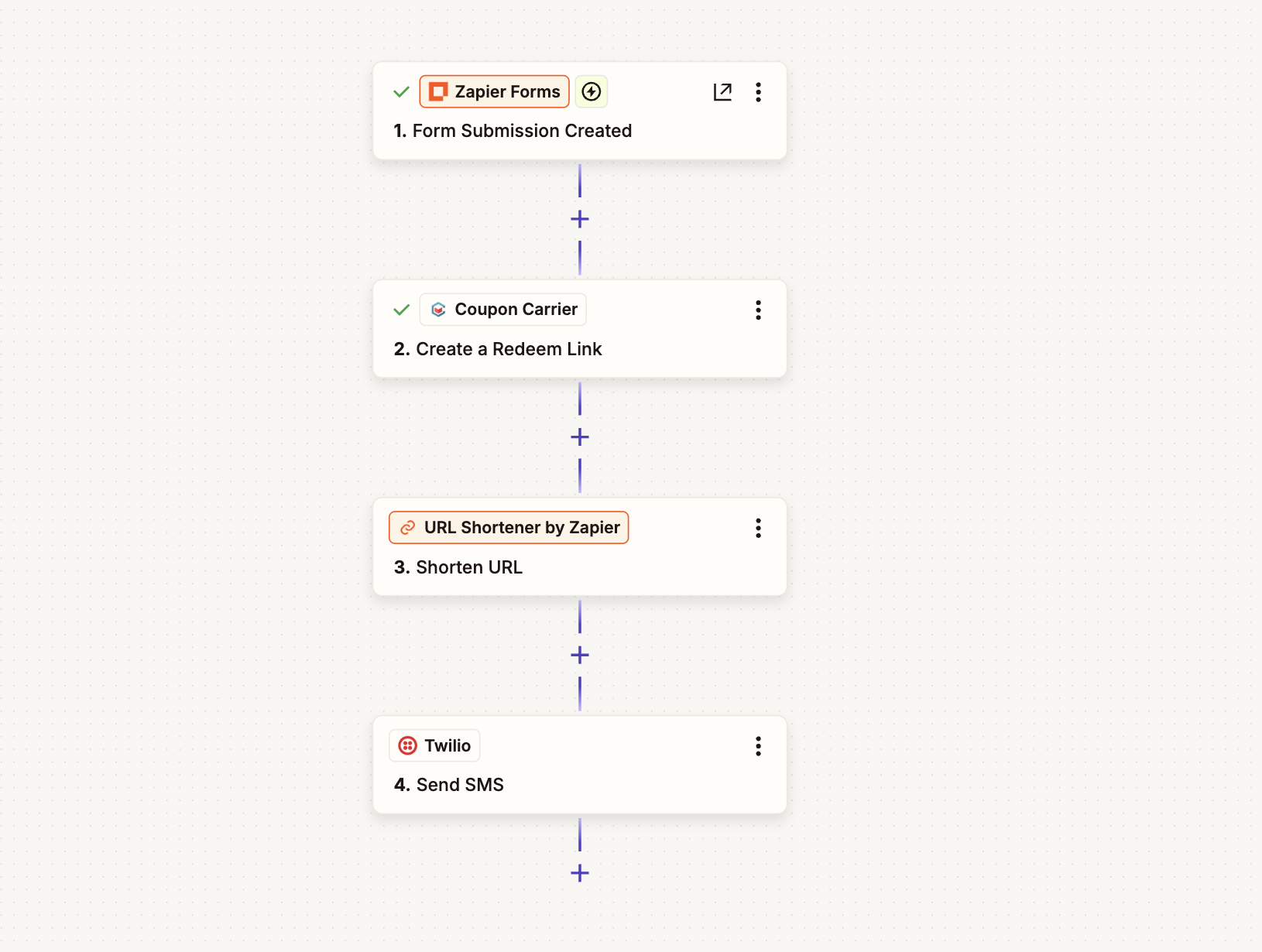
A first-visit restaurant offer is a good fit. The customer submits a short form from a landing page, tablet, or QR signup. Seconds later, they get a text with their personal voucher link.
In-store, staff either tap Mark as Used on the voucher page or scan the voucher QR code from their own device. This is much safer than texting a shared code like WELCOME10.
We tested this exact flow for this article.
Use form name First-Visit SMS Voucher with two fields: first name and mobile phone number.
Suggested copy:

Use trigger: Zapier Forms → Form Submission Created.
Use action: Coupon Carrier → Create a Redeem Link.
For this example, map fields exactly like this:
This step returns the full Redeem Link URL.
If you need a full setup reference, see the Redeem Link setup guide.
Twilio does not shorten the link automatically in this Zapier flow, so add: URL Shortener by Zapier → Shorten URL. Full links still work, but shorter links are usually easier to read in SMS.
Use action: Twilio → Send SMS.
In the Twilio step, configure these fields explicitly:
So the message should contain both normal text and the dynamic shortened-link token, not just the link by itself.
Example SMS format (plain text):
Hi Emma, here's your voucher: https://zpr.io/abc123Hi Emma, thanks for signing up. Show this voucher in store: https://zpr.io/abc123In Zapier, build that message by writing the text and then inserting tokens with the + button (for example: Form Data → First name, and URL Shortener → URL).
Customer receives the text, taps the link, and opens a unique voucher page on their phone. From there, redemption works the same way as any other Coupon Carrier voucher.

SMS is delivery only. Redemption still happens inside Coupon Carrier.
Best for smaller teams, simple launches, and lighter in-store traffic. The customer shows the voucher and staff tap Mark as Used on the voucher page.
Best for busier environments, event entry, or multi-location operations where staff validate from their own device.
In both cases, voucher state changes to used and cannot be redeemed again.
Each tool does one job. Coupon Carrier does not need to be an SMS platform. You need reliable voucher logic and a delivery path that works.
With this setup, sender IDs, country-specific SMS rules, and message templates all stay with your SMS provider. Zapier plus your SMS provider handles delivery. Coupon Carrier handles assignment, single-use enforcement, validation, and tracking.
Twilio is a common SMS provider and easy to demonstrate in Zapier. The same pattern works with other providers too: generate link, optionally shorten it, pass it to your SMS platform, send.
In this Zapier flow, Twilio does not auto-shorten links. If you want shorter SMS links, add a dedicated shortening step before send. Provider-level click tracking varies and should be treated as provider-specific.
Typical use cases: restaurant first-visit offers, event drink vouchers, in-store signup incentives, local retail campaigns, car wash promotions, and agency lead capture flows.
No. If you can generate a Redeem Link and send it through Zapier using your SMS provider, this workflow works.
No. Twilio is the example here. The pattern also works with other SMS providers.
Yes. Full links work. Shortening just improves message readability.
Yes. That is the main reason to send a Redeem Link instead of a raw code.
No. Redemption uses normal in-person validation flow in Coupon Carrier.
If someone asks whether Coupon Carrier supports SMS vouchers, the practical answer is yes, through Zapier.
Create a unique Redeem Link in Coupon Carrier, send it through Twilio or another SMS provider, and keep one-time redemption control and in-person validation intact.
If you already use Zapier and want to send vouchers by text, start here.